

At its simplest, search engine indexing is how search engines like Google store and organise all the information they find on the internet. If a page from your website isn’t in this index, it’s completely invisible. No one will find it through a search.
Think of the entire internet as a colossal, ever-expanding library. Indexing is the process of creating the library’s master catalogue. Without a catalogue card for your book (your webpage), it might as well not exist.
Decoding Search Engine Indexing in Simple Terms
When you publish a new blog post or add a product to your site, it doesn’t just show up in Google automatically. Before anyone can find it, search engines first need to discover it and then add it to their enormous digital library, which is known as the index.
This organised index is the secret behind those lightning-fast search results. Instead of having to frantically search the entire web every time you type a question, Google just consults its pre-sorted catalogue to pull up the most relevant pages in a fraction of a second.
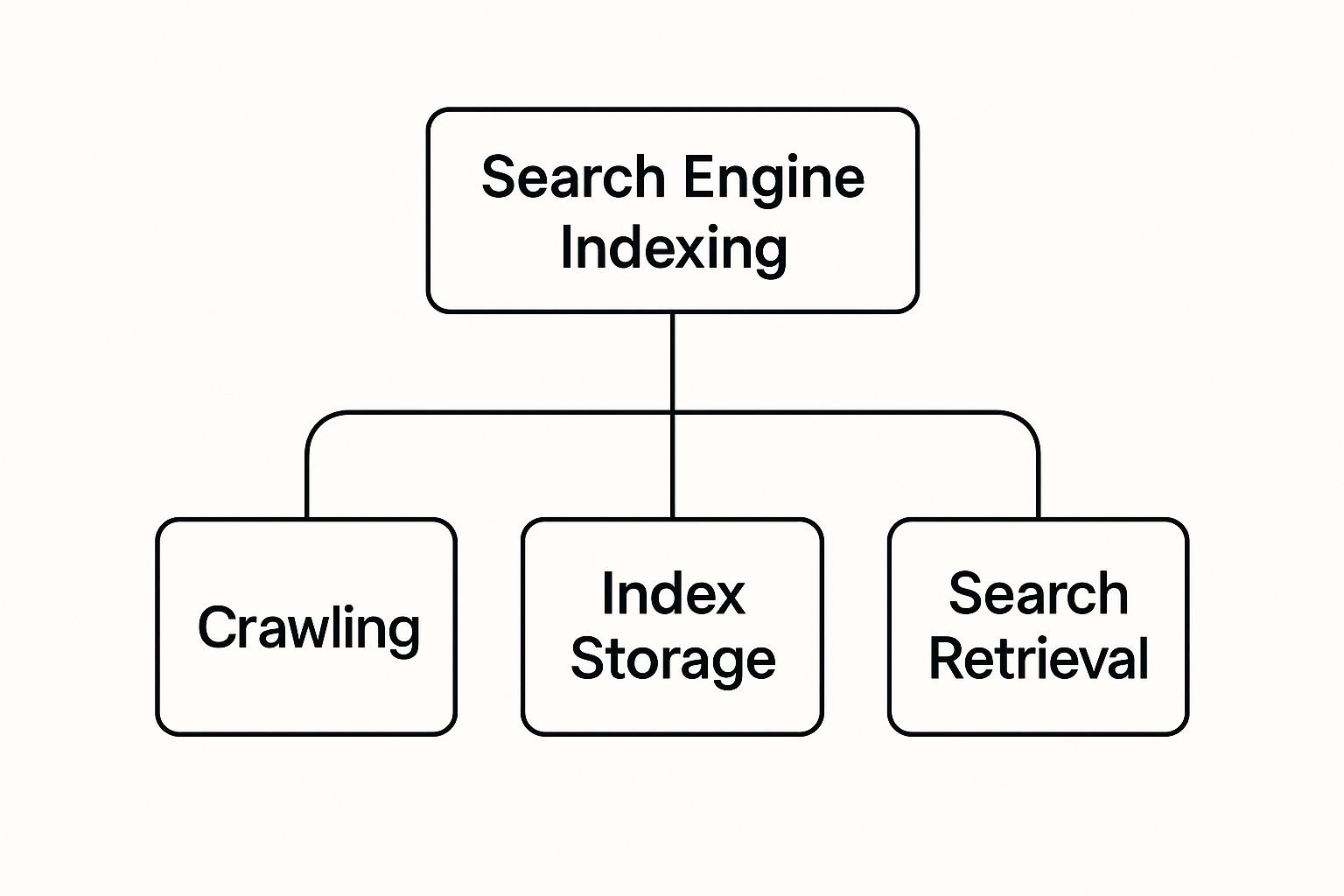
To make this clearer, let’s break down the three fundamental stages every webpage must go through to become visible in search results.
The Three Core Stages of Search Visibility
| Stage | What It Means | Analogy (The Library) |
|---|---|---|
| Crawling | Search engine bots (spiders) discover new and updated pages by following links across the web. | The librarian roams the entire library, looking for new books that have been added to the shelves. |
| Indexing | The bots analyse the content of each page (text, images, videos) and store key information in a huge database. | The librarian reads each new book, creates a detailed catalogue card for it, and files it in the correct drawer. |
| Ranking | When a user searches, the engine sorts through its index to find the best answers and displays them in order. | A visitor asks for a book on a specific topic. The librarian quickly finds the right cards and recommends the most relevant books. |
Each step logically follows the last. Without crawling, there’s no indexing. And without indexing, there’s absolutely no chance of ranking.
This journey from a newly published page to a clickable search result is shown in the diagram below, highlighting how crawling must happen first.
Understanding this process is especially critical in the UK, where Google holds a massive 93.2% of the search engine market share. Getting into Google’s index isn’t just important; it’s everything. You can read more about these figures and what they mean for businesses in this breakdown of UK search engine statistics and their impact.
Key Takeaway: If a page isn’t indexed, it can’t rank. It’s that simple. Before your page has any chance of being seen by your target audience, it must first be successfully catalogued in a search engine’s database.
The Step-By-Step Journey of a Web Page

To really get your head around what search engine indexing is, let’s follow a single web page on its journey, right from the moment you hit ‘publish’ to when it pops up in search results. It all kicks off with discovery.
Search engine bots, often called ‘spiders’ or ‘crawlers’, are constantly travelling the web. Their main job is to find new and updated content, and they do this mostly by following links from pages they already know about.
Once a crawler lands on your new page, it starts the analysis phase. It meticulously reads everything the text, image alt-tags, and the code underneath to figure out exactly what the page is about. This step is vital for determining the page’s topic and its relevance to potential search queries.
From Discovery to Database
After sizing up the content, the search engine makes a call. If your page is deemed valuable and unique, its information gets sorted, categorised, and stored in a colossal database known as the index. Think of this as the final stamp of approval your page is now officially in the library’s catalogue.
This is where a couple of technical files play a huge part in guiding the process.
- Sitemaps: An XML sitemap is basically a map of your website, listing all the important pages you want search engines to find and crawl. Submitting one can really help speed up that initial discovery process.
- Robots.txt: This is a simple text file that sets the ground rules for crawlers. It tells them which pages or sections of your site they can visit and which ones they should stay away from.
The most important factor in this whole journey is creating high-quality, relevant content. If your content is thin or just a copy of something else, a search engine might crawl the page but ultimately decide not to add it to its index.
Understanding how to build pages that both bots and humans love is essential. For a deeper dive, you can learn more about what SEO-friendly content is and how to write it in our guide. This foundational knowledge ensures your pages don’t just get discovered, but are also seen as worthy of being indexed and shown to your potential customers.
Why Indexing Is the Foundation of Your SEO Success
Let’s get straight to the point: if your page isn’t in Google’s index, it might as well not exist. You can have the most brilliant content and a slick design, but if search engines haven’t found and catalogued it, you’re completely invisible to potential customers.
Think of indexing as the gatekeeper to all your business goals. It’s the essential first step before you can even dream of generating organic traffic, building your brand’s authority, or winning new customers through search. Without it, your website is effectively offline.
From Technical Task to Business Strategy
Imagine you’ve just launched a fantastic new product page. If that page fails to get indexed, it will generate zero sales from organic search. Now, picture a well-optimised blog post that gets indexed quickly. It starts pulling in a steady stream of qualified leads, month after month.
That’s why managing your site’s indexability is so much more than a technical box-ticking exercise. It’s a fundamental business strategy that directly shapes your bottom line.
Mastering what is search engine indexing and ensuring it happens smoothly is critical for any online growth. It’s the difference between shouting into an empty room and connecting with an audience that’s ready to listen.
This whole process is a core part of a much wider discipline. To see the bigger picture, it’s worth learning about what is technical SEO and how all the pieces fit together to boost your site’s visibility. This understanding can then be applied to specific goals, like developing effective strategies for dominating local maps SEO.
By making indexing a priority, you give your digital assets a fighting chance to perform, turning your website from a silent, invisible brochure into a powerful engine for growth.
Solving Common Indexing Problems That Hurt Your Site
When one of your key pages suddenly vanishes from Google, it’s rarely a mystery it usually points to one of a handful of common, fixable problems.
More often than not, the culprit is a stray noindex tag accidentally telling Google’s bots to ignore the page, or a crawl error logged in Google Search Console that’s stopping them in their tracks. Other times, issues like duplicate content or poor internal linking can leave crawlers confused or, worse, leave important pages completely undiscovered.
A few common culprits include:
- Accidental noindex tags blocking pages from being indexed.
- Crawl errors like 404s or server timeouts halting bots.
- Duplicate or thin content getting flagged as low value.
- Poor internal linking leaving pages orphaned and invisible.
Identifying Noindex and Crawl Errors
Your first port of call should always be Google Search Console’s URL Inspection Tool. Pop in the URL of the missing page, and it will tell you everything you need to know about its crawl and index status.
This tool is brilliant because it flags specific issues, from crawl anomalies to metadata problems like a noindex tag. If you find a page is blocked, it’s often as simple as removing the directive and asking Google to reindex it.
“A single misplaced tag can hide a high-value page from your audience.”
Next, head over to the Coverage report (now called the Pages report) to see a bigger picture. It breaks down your site into Errors, Valid, and Excluded pages, highlighting server problems, DNS issues, or unintentional blocks that are preventing indexing.
It’s also worth remembering that the goalposts are always moving. The quality, freshness, and comprehensiveness of Google’s index are critical for relevant search results, and this can be affected by major algorithm changes. For instance, some UK sites like Techopedia saw a significant drop in visibility during 2024-2025 due to penalties linked to Google’s evolving indexing policies. You can keep an eye on UK search trends via StatCounter.
To stay on the right side of these changes, it’s vital to keep up with understanding Google’s spam updates.
Quick Fixes for Common Indexing Issues
When you run into an indexing headache, the fix is usually straightforward once you’ve diagnosed the cause. Here’s a quick-reference table to help you match common problems with their most likely solutions.
| Problem | Potential Cause | How to Fix It |
|---|---|---|
Stray noindex tag |
A misplaced meta directive in your HTML or CMS. | Find and remove the tag, then request reindexing in GSC. |
| Crawl errors | Server timeouts, DNS failures, or robots.txt blocks. |
Resolve server issues and check your robots.txt for blocks. |
| Duplicate content | URL parameters, session IDs, or CMS quirks. | Consolidate signals using a canonical tag on the preferred URL. |
| Orphaned pages | No internal links pointing to the page. | Add relevant, contextual links from main pages or hubs. |
| Excessive redirects | Long redirect chains confusing crawlers. | Simplify chains to a single 301 redirect wherever possible. |
This table covers the most frequent offenders, but remember to always use the URL Inspection Tool for a definitive diagnosis before making any changes.
Common Indexing Questions And Answers
- How do I detect orphaned pages?
Use a site-crawling tool like Screaming Frog or Sitebulb to crawl your website. Compare the list of crawled URLs against your sitemap to find any that have no internal links pointing to them. - How can I remove an accidental noindex tag?
You’ll need to edit the page’s HTML source code or find the relevant setting in your CMS (like Yoast SEO in WordPress). Remove themeta name="robots" content="noindex"tag, save the page, and then request reindexing via Google Search Console. - Why are pages stuck in ‘Discovered – currently not indexed’?
This status means Google knows the page exists but has chosen not to crawl it yet. This can happen if your site has a low crawl budget, the page seems low-quality, or it’s too similar to another indexed page. Improving internal linking and overall site quality can help. - What’s the best way to fix duplicate content?
The gold standard is the canonical tag. Identify the main version of the page you want Google to index, and on all the duplicate versions, add arel="canonical"tag pointing to that primary URL. Also, be sure to update your internal links to point directly to the canonical version. - Do crawl errors affect mobile-bot indexing?
Yes, absolutely. Since Google operates on a mobile-first indexing model, any errors that specifically affect the mobile version of your site can be particularly damaging. This includes mobile-specific crawl errors, blocked resources (like CSS or JS), or poor mobile usability.
How To Check If Your Pages Are Indexed
It’s not enough to publish a blog post or a new product page and simply hope Google finds it. Think of indexing as your content’s ticket into the search engine’s library no ticket, no audience. Checking your site’s indexing status is a quick health check that anyone can run.
Fortunately, you don’t need advanced technical skills. Google offers a free, user-friendly console that serves as your direct line to how it crawls and indexes your site.
Using Google Search Console
Google Search Console is your go-to dashboard for indexing insights. Inside, two tools stand out:
- URL Inspection Tool
Paste any page URL here to get an instant verdict on whether it’s indexed, view mobile-usability feedback and spot crawl errors in real time. - Index Coverage Report
This site-wide overview breaks your pages into Error, Valid with warnings, Valid and Excluded. It highlights patterns like site-wide redirects or blocked pages so you can prioritise fixes.

From the main dashboard you can drill down into each category, pinpoint trouble spots and track your improvements over time.
Quick Google Search Commands
When you need a super-fast check without signing in, use a simple search operator:
- Type site:yourwebsite.co.uk into Google’s search bar.
This will list every page from your domain that Google has indexed. If a page you expect to see doesn’t appear, it’s a clear sign it hasn’t been crawled yet. While this method won’t show mobile-friendly issues or warnings, it’s a brilliant first step.
For a step-by-step walkthrough and troubleshooting tips, see our detailed guide on how to check if your pages are indexed.
Frequently Asked Questions About Search Indexing
Once you start digging into what search engine indexing is, a few common questions always pop up about the timing, the process, and what can go wrong. Let’s tackle them one by one.
1. How long does it take for Google to index a new page?
Honestly, it varies. We’ve seen it happen in a few hours, but it can also take several weeks. Key factors include your site’s overall authority, how often Google’s bots visit (crawl frequency), and whether you’ve submitted a sitemap.
Giving a page a little nudge by requesting indexing manually in Google Search Console often helps speed things up.
Key Insight: A smart internal linking structure is one of the best ways to get new pages discovered faster. Link to new content from your popular, high-traffic pages.
Factors that can give you a speed boost include:
- Quality content that’s unique and genuinely useful to readers.
- Internal links from important pages on your site.
- Frequent updates that signal to Google your site is active and fresh.
2. What is the difference between crawling and indexing?
This is a classic, and the distinction is crucial. Crawling is simply the discovery phase. Think of Google’s bots as explorers following a map of links to find new pages on the web.
Indexing is the analysis phase. Once a page is found, Google tries to understand what it’s about, cataloguing its content and storing it in a gigantic database. A page must be indexed to have any chance of showing up in search results.
- Crawling = Finding the book.
- Indexing = Adding the book to the library’s catalogue.
A page can be crawled but never indexed, especially if it has a noindex tag telling Google to stay away. Just because a bot has visited doesn’t guarantee visibility.
3. Why would Google choose not to index my page?
It happens, and it’s usually for a good reason. The most common culprits are low-value or duplicate content, crawl errors that stop Google in its tracks, or an accidental noindex meta tag blocking the page.
If Google’s algorithm decides a page isn’t helpful, it might crawl it but simply decide not to add it to the index. It’s all about quality control.
The best way to diagnose this is with the URL Inspection Tool in Google Search Console. It’s like a health check for your page, highlighting any crawl errors or indexing directives that are causing the problem. Also, give your sitemap and robots.txt file a quick look to make sure you haven’t accidentally blocked access.
4. Can I remove a page from Google’s index quickly?
Yes, you can. The permanent solution is to add a noindex tag to the page’s HTML. This tells Google to remove it from the index the next time it crawls the page.
For a much faster, more immediate removal, use the Removals tool in Google Search Console. This is perfect for when you need a page gone right now.
Here’s the process:
- Add
<meta name="robots" content="noindex">to your page’s HTML head section. - Go to GSC and submit a removal request for the URL.
- Google will remove it temporarily, and once it re-crawls and sees the
noindextag, the removal becomes permanent.
Keep in mind that temporary removals via the tool expire after about six months, so adding the noindex tag is essential for a long-term solution.
5. Is being indexed the same as ranking on the first page?
Not at all. Think of it this way: being indexed just means your page is eligible to appear in search results. It’s your ticket to the game.
Ranking refers to its actual position in those results whether you’re on page one or page ten. You need both to succeed. First, you get indexed, then you optimise your page to climb the rankings.
- Indexation = You’re in the library.
- Optimisation = Your book is on the “featured” shelf at the front.
“Getting into the index is your ticket to the game; ranking well is how you win.”
Each of these questions builds on the core concept of search indexing, helping you troubleshoot issues and give your site the best possible chance to be seen.
Ready to get your pages indexed and climb the rankings? Discover expert support with GFC Tech’s SEO services.
Adam is a Founder of GFC Tech, a company dealing in SEO and website design and development services. Adam has been an SEO expert for the past 8 years and has been working with different companies in this field. He is an SEO consultant and a marketing strategist and works closely with his clients to ensure that his marketing plans and strategies provide them with the marketing advantages they need to grow their business. Adam’s main role is an SEO consultant, but he is also involved in all technical aspects. Adam also develops WordPress websites, designs them professionally and performs SEO for them so they can rank on the first page of google.


