

When you’re trying to win over local customers, your Google Business Profile isn’t just another listing it’s the core of your local search presence. Smart Google Business Profile optimisation is all about transforming this free tool from a simple online entry into your most powerful magnet for attracting people from Google Search and Maps. It’s how you get found, trusted, and chosen.
- Why Your GBP Is Your Digital Front Door
- Building Your Foundation for Maximum Trust
- Filling Out Your Profile to Answer Every Question
- Driving Engagement with Photos, Posts and Q&A
- Mastering Reviews and Messages to Build Reputation
- Using Performance Insights to Stay Ahead
- Common Questions About GBP Optimisation
Why Your GBP Is Your Digital Front Door

Think of your Google Business Profile (GBP) as the digital equivalent of your shop window or front door. For a huge number of potential customers, it’s the very first time they’ll interact with your brand. It’s no longer a static business card online; it’s a dynamic, interactive snapshot that can either draw people in or send them to a competitor.
The way people find local businesses has fundamentally changed. They expect accurate, instant information right where they’re searching. In fact, we know that over 70% of consumers look up a business’s profile on Google to check information and read reviews before they even think about making a purchase. You can find more on this trend and what it means for businesses like yours by exploring how customer behaviour has shifted.
A fully optimised profile does more than just share information; it actively builds trust. When a potential customer sees up-to-date photos, recent reviews with thoughtful replies, and correct opening hours, it sends a clear signal: this business is active, reliable, and genuinely cares about its customers.
That initial spark of trust is crucial. It sets the tone for every action that follows, whether a customer decides to call you, visit your website, or get directions to your physical location. For businesses that depend on local trade, like those in the property sector, this digital first impression is non-negotiable.
This table breaks down the core elements of a winning GBP strategy and the direct impact each has on your local search performance.
Key Pillars of Google Business Profile Optimization
| Optimization Pillar | What It Achieves | Why It Matters for Local SEO |
|---|---|---|
| Complete & Accurate Info | Builds trust with correct NAP, hours, and services. | Accuracy is a key local ranking factor. |
| Engaging Visuals | Showcases your work, team, and premises. | High-quality photos increase user engagement and clicks. |
| Consistent Reviews | Creates social proof and provides customer feedback. | Positive review signals are critical for local pack visibility. |
| Regular Posts & Q&A | Keeps your profile active and answers common queries. | Fresh content tells Google your profile is relevant and active. |
Ultimately, a neglected profile suggests a neglected business. A well-tended GBP, on the other hand, is the cornerstone of any effective local SEO for small business strategy. It’s your most powerful free tool for turning local searchers into paying customers.
Building Your Foundation for Maximum Trust
This is where so many businesses stumble on their Google Business Profile optimisation journey: getting the basics right. Before you even think about adding eye-catching photos or chasing five-star reviews, you need to build a solid, trustworthy foundation. It all starts with absolute precision in your core business information.
Your business name, address, and phone number what we in the industry call NAP are the cornerstones of your digital identity. If there’s one thing Google obsesses over, it’s consistency. If your profile says “Joe’s Plumbing & Heating Ltd”, it can’t be “Joe’s Plumbing” on a local directory or “JPH Ltd” on your website.
These seemingly tiny slip-ups create huge confusion for both Google and your potential customers. Think of it this way: if you told three friends three different addresses to meet you at, you’d end up with chaos. For Google, this inconsistency demolishes trust and directly torpedoes your chances of ranking in local search.
A verified and consistently represented profile acts as a digital badge of credibility. It tells Google that your business is legitimate, operational, and located exactly where you claim to be.
Nailing the Verification Process
Once you’ve got your NAP details perfectly aligned across the web, the next hurdle is verification. Google needs to confirm that you are the rightful owner of the business profile, a crucial step to prevent fraud and protect your brand from being hijacked. You’ll usually be offered a few different ways to get this done.
- Postcard by Mail: This is the classic, most common method. Google pops a postcard in the mail to your business address, containing a unique verification code.
- Phone Call or Text: Some businesses will see an option for an automated call or text to their listed business number. It’s quick, if you’re eligible.
- Email: This method is only available for certain businesses and sends the code to an official business email address (e.g., you@yourcompany.co.uk).
- Video Verification: You might be asked to record a short video showing your physical location, business signage, and proof that you manage the premises.
While a phone call is the fastest route, the postcard is the most reliable fallback. If you have to go the mail route, be patient; it can take up to two weeks to arrive. Whatever you do, avoid making any edits to your profile while you wait. This common mistake can reset the entire process and leave your profile stuck in verification limbo.
Getting this right is non-negotiable. Statistics show that complete and verified Google Business Profiles are twice as likely to earn customer trust and engagement. You can find more data on this over at sqmagazine.co.uk’s guide to building customer trust.
Frequently Asked Questions
1. What if my business address is my home?
No problem. If you’re a service-area business (like a mobile dog groomer or a consultant), you can hide your physical address. During setup, you’ll simply specify the postcodes or towns you serve. Your home address will only be used for the one-off verification process and won’t be shown to the public.
2. How long does Google verification take?
The postcard method usually takes 5-14 business days. Phone or email verification can be almost instant. If your postcard doesn’t show up after 14 days, you can log back in and request a new one.
3. What is the most common verification mistake?
By far, the biggest mistake is having inconsistent NAP information. Before you even start, triple-check that the address you’ve entered matches your official documents and other online listings exactly. This will prevent the postcard from getting lost or the verification being rejected.
4. Can I change my details after verification?
Yes, but tread carefully. Major changes, particularly to your business name or address, can trigger a re-verification. Google will want to confirm the new details are legitimate before they go live.
5. What happens if verification fails?
Don’t panic. First, double-check every single piece of information for accuracy and make sure you’ve followed Google’s guidelines to the letter. Then, you can simply try the process again or, if you’re still stuck, reach out to Google support for assistance.
Filling Out Your Profile to Answer Every Question

A sparse, incomplete profile sends a clear message to potential customers: you might not be paying attention. To really get results with Google Business Profile optimisation, you need to move beyond the basics and strategically fill out every single field. This isn’t just about ticking boxes; it’s about building a rich, informative resource that answers a customer’s questions before they even have to ask.
The best place to start is with one of the most critical ranking factors on your profile: your business categories. Your choice of a primary category is hugely influential. It tells Google what you mainly do and directly impacts the searches you show up for. A “Nail Salon” will rank for entirely different local searches than a generic “Beauty Salon”.
Be as specific as you possibly can. From there, you can add secondary categories to capture all the other relevant things you offer. A restaurant might use “Restaurant” as its primary category, but add “Event Venue” and “Outdoor Seating” to appear in a wider range of discovery searches. It’s worth the effort a BrightLocal study found that a massive 84% of profile views come from these discovery searches, not from people searching for your business by name. This highlights just how crucial correct categorisation is.
Crafting a Compelling Business Description
Next up is your business description. You have 750 characters to tell your story, so make them count. This is your chance to go beyond a simple list of services and actually connect with potential customers.
Don’t waste space repeating information that’s already in other sections. Instead, focus on what makes you different.
- Talk about your business’s origin story or mission.
- Mention your years of experience or unique approach to your work.
- Naturally weave in keywords your target audience uses, like “eco-friendly cleaning” or “emergency plumber in Surrey”.
Think of this section as your business’s “About Us” page in miniature. It’s the perfect spot to build trust and show a bit of personality.
Your profile attributes are quick, scannable pieces of information that can sway a customer’s decision. These factual highlights, like ‘Free Wi-Fi’, ‘Wheelchair-accessible entrance’, or ‘Women-led’, allow you to match specific customer needs instantly.
Completing your profile can feel like a big job, but the payoff is immense. For businesses that need a hand, exploring dedicated Google Business Profile optimisation services can provide the expert support needed to get every detail just right.
Frequently Asked Questions
1. How many secondary categories should I add?
There’s no magic number here. Focus on quality over quantity. Only add categories that accurately represent a significant part of what you do. Piling on irrelevant categories can actually dilute your relevance for your main service.
2. Can I edit my business description later?
Yes, and you absolutely should. As your business evolves, update your description to reflect new services, highlight recent achievements, or align with your current marketing campaigns. A fresh profile is a trusted profile.
3. Where do I find attributes to add?
Once you’ve selected your primary business category, Google will automatically show you a list of relevant attributes. You just need to go through the list and select everything that applies to your business.
4. Should I add prices to my products and services?
If you can, yes. Price transparency builds immediate trust and can help pre-qualify customers. If your pricing isn’t fixed, you can always provide a starting price (“from £50”) or a price range.
5. How are attributes different from the business description?
Attributes are standardised, selectable tags provided by Google (e.g., “Free Wi-Fi”). The description is a free-text paragraph where you write your own unique summary. Both are vital for creating a complete, trustworthy profile.
Driving Engagement with Photos, Posts and Q&A
A static Google Business Profile is an invisible one. To get noticed, your profile needs to be alive with activity. This constant hum tells Google your business is active, engaged, and relevant to what people are searching for right now. Features like photos, Posts, and the Q&A section are your best tools for creating that essential buzz.
Think of your photo gallery as a visual handshake. It’s often the first thing a potential customer explores, and profiles with photos get 35% more clicks to their websites. Your mission is to give them an authentic, up-to-date glimpse into your business that builds instant trust.
Curate Your Visual Showcase
Don’t just dump a few random pictures and hope for the best. A smart, strategic approach to your photos can make a huge difference to engagement. Make it a habit to add high-quality images that cover all the key parts of your business.
This simple workflow gives you a clear path for uploading photos to get maximum impact.
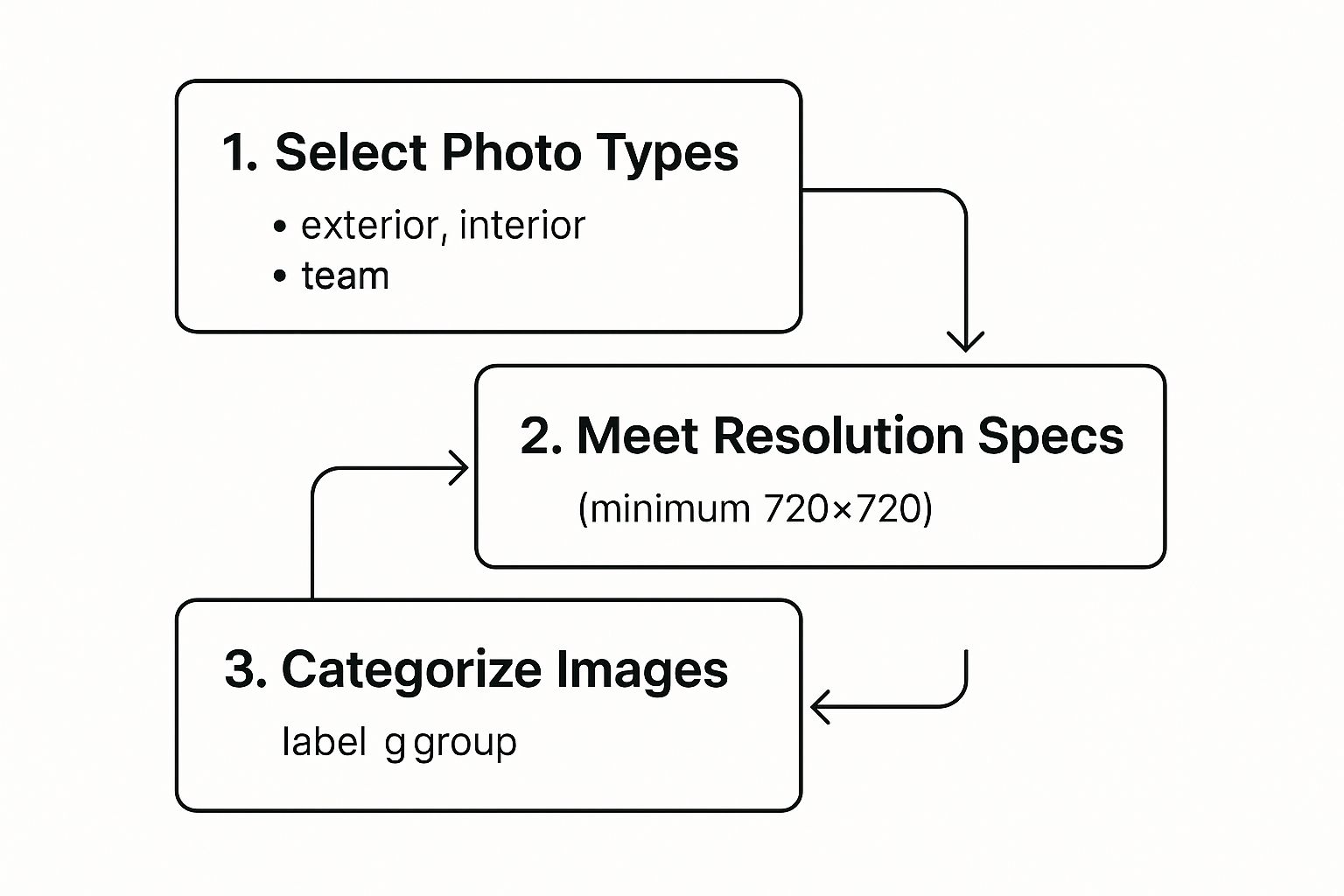
When you follow these steps mixing up your photo types, hitting the right technical specs, and organising them logically you build a rich, helpful gallery that wins over both customers and Google.
Turn Your Profile into a Marketing Channel
Google Posts are a game-changer. They turn your static listing into a dynamic mini-blog, perfect for sharing timely news and keeping your audience in the loop. Use them to announce things like:
- Special Offers: A weekend discount or a seasonal sale.
- Upcoming Events: A workshop, open day, or your latest community project.
- New Products or Services: Show off what’s new and exciting.
- Business Updates: Changes to opening hours, new team members, or company news.
Aim to publish at least one Post per week. That consistency is a powerful signal to Google that you’re actively managing your profile and paying attention. A simple schedule can make all the difference.
To stay on track, a weekly plan is your best friend. It turns a big task into small, manageable actions, ensuring your GBP stays fresh and active.
Weekly GBP Engagement Plan
| Day of the Week | Recommended Activity | Primary Goal |
|---|---|---|
| Monday | Review new questions & reviews. | Maintain responsiveness and manage reputation. |
| Wednesday | Publish one new Google Post (e.g., offer, update). | Keep the profile fresh and signal activity to Google. |
| Friday | Upload 2-3 new photos or a short video. | Showcase business activity and improve visual appeal. |
| Once a Month | Add a new FAQ to the Q&A section. | Proactively address customer concerns and control the narrative. |
This rhythm helps you build momentum without feeling overwhelmed, keeping your profile a hub of useful, current information that attracts customers.
The Q&A section is one of the most under-utilised yet powerful features on your profile. Anyone can ask a question, and crucially, anyone can answer. If you don’t control the conversation here, someone else will and they might get it wrong.
Get ahead of this by proactively adding your own frequently asked questions and then providing clear, helpful answers. Think about what customers always ask you on the phone or in emails. Put those answers right there on your profile. It’s the perfect way to tackle common concerns, highlight key selling points, and stop misinformation in its tracks.
Your Top Questions Answered
1. What size should my Google Business Profile photos be?
For the best quality, Google suggests images should be at least 720×720 pixels and in JPG or PNG format. Try to keep the file sizes small (under 5MB) so they load quickly for everyone.
2. Can I schedule Google Posts in advance?
Right now, Google doesn’t have a built-in scheduling tool in the GBP dashboard. However, many third-party social media management platforms like Hootsuite or Buffer offer integrations that let you schedule Posts.
3. Do Google Posts expire?
Most standard Google Posts fade from prime visibility after seven days, though they’re still visible further down your profile. Offer and Event posts are the exception; they stay live for the entire duration you set for the promotion.
4. How do I get notified about new questions on my profile?
Make sure your notification settings are switched on in your Google Business Profile account. This will fire off an email alert whenever a new question or review is posted, so you can jump on it and respond quickly.
5. Should I use videos as well as photos?
Absolutely. Short videos (up to 30 seconds) are brilliant for engagement. Think about a quick tour of your premises, a product demo, or a brief hello from a team member to add a really dynamic feel to your profile.
Mastering Reviews and Messages to Build Reputation
In local search, your reputation is your most valuable currency. Potential customers lean heavily on social proof to decide where to spend their money, and your Google Business Profile is often the first place they look. Nailing your reviews and messages isn’t just a tick-box exercise for Google Business Profile optimisation; it’s fundamental to building real-world trust and authority.
It all starts with encouraging your happy customers to share their experiences. It’s a staggering statistic, but 98% of customers read online reviews for local businesses. This makes your star rating and the actual content of your reviews a primary decision-making factor. The most effective strategy? Just ask. A polite request after a job well done can make all the difference.
The Art of Responding to Every Review
How you handle reviews both good and bad is often more revealing to potential customers than the original review itself. A thoughtful reply shows you’re engaged, you appreciate feedback, and you’re committed to customer satisfaction. This is non-negotiable.
- For positive reviews: Thank the customer personally. Try to mention a specific detail from their feedback to show you’ve actually read it, and let them know you’d love to see them again.
- For negative reviews: Respond quickly and professionally. Acknowledge their frustration, take ownership without getting defensive, and offer to resolve the issue offline. This public display of accountability can turn a negative experience into a net positive for your reputation.
A crucial part of mastering reviews involves not just getting them, but showing them off. You can amplify their impact when you display Google reviews directly on your website, turning your profile’s social proof into a powerful asset across your entire online presence.
Taking a proactive approach to your reputation signals to both Google and customers that your business is active and trustworthy. For a deeper dive into building a resilient brand image, our guide on online reputation management for small business provides a comprehensive framework.
Turn Your Profile into a Lead-Capture Tool
Beyond reviews, Google’s Messaging feature transforms your profile from a static listing into a direct line for customer communication. By enabling this, you let potential customers send you a text straight from your profile, satisfying that modern demand for instant answers.
Responding quickly is the name of the game here. It allows you to answer questions, provide quotes, and capture leads in real-time often before a competitor even gets a look-in. This responsiveness is another powerful signal that builds a positive, active business reputation.
Frequently Asked Questions
1. How do I get a link to ask customers for a review?
You can grab a direct review link from your Google Business Profile dashboard. Head to the “Get more reviews” section, and you’ll find a shareable link that takes customers straight to the review form. This makes the process incredibly quick and easy for them.
2. Should I respond to every single review I receive?
Yes, it’s best practice to reply to all of them. Responding to both positive and negative comments shows you value all customer feedback and are actively managing your online presence.
3. Will deleting my profile remove bad reviews?
No, and it’s a terrible idea to even try. Deleting and recreating a profile won’t erase old reviews, and you’ll likely lose all your profile’s history and rankings. It’s always better to address negative feedback head-on.
4. How quickly should I respond to Google Messages?
Aim to respond within minutes if you can. Google often displays an average response time on your profile, so prompt replies not only help the customer but also boost your reputation for being responsive.
5. Can I offer incentives for reviews?
Definitely not. Offering incentives like discounts or freebies in exchange for reviews is a direct violation of Google’s policies. You can, however, ask every customer for their honest feedback without offering any kind of reward.
Using Performance Insights to Stay Ahead
Optimising your Google Business Profile isn’t a one-off job; it’s an ongoing process of tweaking, testing, and refining. To build a high-performing profile that consistently outshines your competitors, you need to pay close attention to what the data is telling you. Regularly diving into your performance insights is the key to sharpening your Google Business Profile optimisation strategy.
Thankfully, Google gives you built-in reports that take the guesswork out of understanding how customers find and interact with your profile. These aren’t just vanity metrics; they’re genuine, actionable insights.
Think of your performance reports as a direct feedback loop from your customers. They show you exactly what’s working, what isn’t, and where you should focus your energy for the biggest impact.
For example, you can see how many people found you through discovery searches versus direct searches, which tells you a lot about how effective your category and keyword choices are. You can also see the number of calls, website clicks, and direction requests your profile is generating. If you notice a sudden spike in direction requests right after uploading new photos of your shopfront, that’s a clear signal your visual content is hitting the mark.
Future-Proofing Your Profile
Looking ahead, Google’s platform is always evolving. The big development to watch right now is the deeper integration of AI. We’re already seeing it in how Google generates business summaries and answers complex queries directly in search results.
In fact, many upcoming Google Business Profile updates in 2025 will centre on enhanced AI features, aiming to improve customer interaction and automate support. This means having rich, detailed, and accurate information on your profile will become even more critical. The AI will rely on that information to answer user questions directly. You can get a head start by reading more about these changes and discover more insights about upcoming GBP updates on W3-Lab.com.
By keeping your profile complete and current, you’re not just optimising for today’s algorithm; you’re future-proofing your business for tomorrow’s.
Frequently Asked Questions
1. Where do I find my GBP performance reports?
You can get to your performance data straight from your Google Business Profile dashboard. Just look for the “Performance” tab. It gives you all the detailed metrics on interactions, calls, and how customers found you.
2. What are the most important metrics to track?
You should focus on the metrics that line up with your actual business goals. The key ones are usually:
- Search Queries: The exact keywords customers are using to find your business.
- User Actions: The tangible results like website clicks, direction requests, and phone calls.
- Photo Views: A great indicator of how engaging your visual content is.
3. How often should I check my GBP insights?
A monthly review is a solid starting point for most small businesses. It lets you spot trends and make informed decisions without getting lost in daily noise.
4. What does “discovery” vs “direct” search mean in reports?
A “discovery” search is when a customer found you by searching for a category, product, or service (like “plumber near me”). A “direct” search is when they typed in your business name specifically. A high rate of discovery searches is a fantastic sign that your local SEO is working well.
5. How can I use insights to improve my ranking?
The insights give you direct clues. If your reports show low website clicks, try creating a Google Post with a compelling offer and a clear call-to-action button. If you see that certain search queries are driving a lot of traffic, it’s a good idea to weave them naturally into your business description or the Q&A section.
Common Questions About GBP Optimisation
Getting to grips with the finer points of Google Business Profile optimisation always brings up a few questions. Here are straightforward answers to five of the most common queries we hear from business owners aiming to win in their local market.
1. How long does Google Business Profile optimization take to show results?
While some basic updates appear instantly, seeing a significant impact on your local search ranking can take anywhere from a few weeks to several months. Key factors include your starting point, local competition, and how consistently you manage your profile. Regular activity, like weekly Posts and responding to all reviews, sends strong positive signals to Google and can speed up the process.
2. What are the most important parts of a Google Business Profile for ranking?
If you’re short on time, focus on the three pillars with the biggest impact:
- Categories: Your primary and secondary categories are crucial for telling Google what you do. Be specific.
- NAP Consistency: Your Name, Address, and Phone number must be identical across all online listings.
- Reviews: A steady stream of positive reviews, and your responses to them, heavily influences trust and ranking.
3. How do I handle negative reviews on my profile?
First, don’t ignore them. Respond quickly, publicly, and professionally. Acknowledge the customer’s issue, apologise for their negative experience, and offer to resolve the problem offline. This shows potential customers that you take feedback seriously and are committed to customer service, which can turn a negative into a positive for your reputation.
4. Do I need a physical storefront to have a GBP?
No, you don’t. Service-area businesses (like plumbers, landscapers, or consultants) that travel to their customers can create a profile. During setup, you’ll hide your physical address (which is often your home) and instead specify the postcodes or towns you serve. Your address is only used for verification and will not be displayed to the public.
5. What is the difference between Google Posts and the Q&A section?
Google Posts are like mini-adverts or blog posts that you create to share updates, offers, or news. They are proactive marketing messages from the business to the customer. The Q&A section, on the other hand, is a reactive feature where anyone can ask a question about your business, and anyone (including you) can answer. It’s crucial for you to monitor this section to provide accurate information and manage your brand’s narrative.
At GFC Tech, we help small businesses in Surrey and beyond turn their Google Business Profile into a powerful tool for attracting local customers. If you’re ready to get found, trusted, and chosen, we can help.
Explore our SEO services to learn how we can optimise your digital presence.
Adam is a Founder of GFC Tech, a company dealing in SEO and website design and development services. Adam has been an SEO expert for the past 8 years and has been working with different companies in this field. He is an SEO consultant and a marketing strategist and works closely with his clients to ensure that his marketing plans and strategies provide them with the marketing advantages they need to grow their business. Adam’s main role is an SEO consultant, but he is also involved in all technical aspects. Adam also develops WordPress websites, designs them professionally and performs SEO for them so they can rank on the first page of google.


