

In the competitive digital marketplace of Surrey and the South East, attracting visitors to your website is only half the battle. The real challenge for local businesses lies in converting that hard-won traffic into tangible results: leads, sales, and loyal customers. Many small and medium-sized enterprises invest heavily in driving traffic through SEO and paid ads, only to see potential customers leave without taking any meaningful action. This gap between traffic and results is where Conversion Rate Optimisation (CRO) becomes your most valuable asset.
This guide provides seven actionable conversion rate optimization tips, moving beyond generic advice to offer specific, data-driven strategies tailored for businesses in the trades, hospitality, and professional services sectors. We will explore how to refine every critical element of your online presence, from A/B testing your landing pages and optimising calls-to-action to enhancing website speed and integrating powerful social proof.
For business owners who are often time-poor and need clear, impactful guidance, mastering these techniques is the key to unlocking sustainable growth. By focusing on improving the user experience for every visitor, you can significantly increase the return on your digital marketing investment, ensuring your website works as hard for your business as you do. Let’s dive into the practical steps you can take today to turn more clicks into customers.
- 1. A/B Testing and Experimentation
- 2. Landing Page Optimization
- 3. Call-to-Action (CTA) Optimization
- 4. Social Proof Integration
- 5. Website Speed and Performance Optimisation
- 6. Mobile-First Design and Optimization
- 7. Trust Signals and Security Features
- 7 Key Conversion Rate Optimization Tips Comparison
- Start Your Journey to Higher Conversions Today
- Frequently Asked Questions about Conversion Rate Optimisation
1. A/B Testing and Experimentation
Guesswork has no place in a successful marketing strategy. Instead of relying on gut feelings or personal preferences, one of the most powerful conversion rate optimization tips is to adopt a scientific approach. A/B testing, also known as split testing, allows you to do just that. It involves creating two or more versions of a web page or marketing asset to see which one performs better with your audience.
By showing one version (the “control” or ‘A’) to one segment of your traffic and a different version (the “variation” or ‘B’) to another, you can gather real-world data on what resonates most. This data-driven method removes ambiguity and helps you make informed decisions that genuinely improve your conversion rates. Industry giants rely on this process; for example, Booking.com runs thousands of tests annually, optimising everything from button colours to urgency messaging to refine their user experience and boost bookings.
How to Implement A/B Testing
Getting started doesn’t have to be complex. The core idea is to change one single element at a time to isolate its impact. If you change both the headline and the call-to-action (CTA) button colour, you won’t know which change caused the increase or decrease in conversions.
Focus your initial efforts on high-impact areas of your website:
- Headlines: Does a question-based headline perform better than a statement?
- Call-to-Action (CTA) Buttons: Test the wording (e.g., “Get a Free Quote” vs. “Learn More”), colour, and placement.
- Forms: Would reducing the number of fields in your contact form increase submissions?
- Images and Videos: Test different visuals to see which one captures more attention.
The infographic below illustrates the simple, foundational workflow of an A/B test.
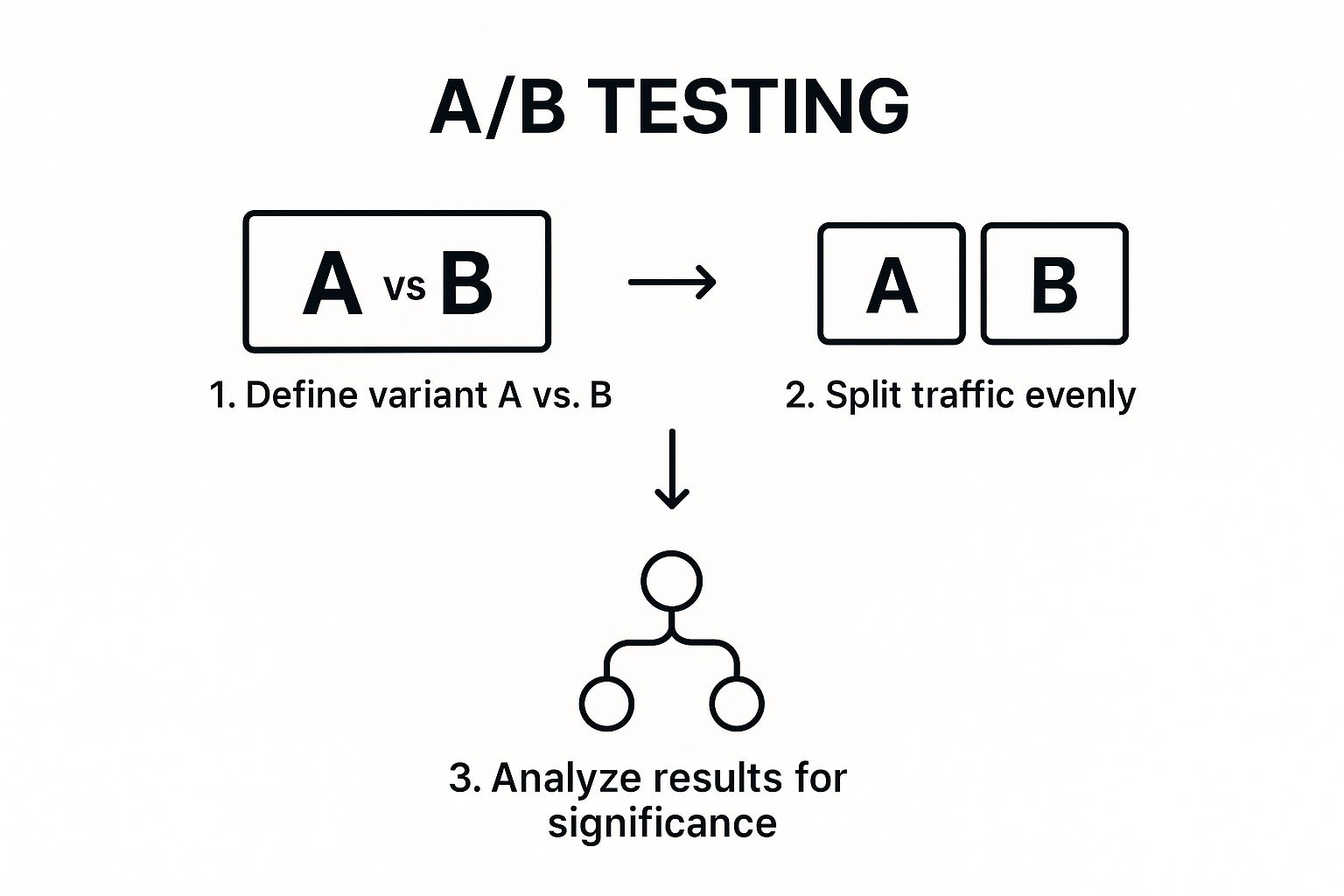
This diagram highlights that successful testing follows a structured, logical sequence, ensuring that the results you gather are reliable and actionable.
For a deeper dive into the methodology and mindset behind effective A/B testing, the video below offers some excellent insights.
Always ensure your test runs long enough to achieve statistical significance. This means you have enough data to be confident the result isn’t just a random fluke. Tools like Google Optimize (now part of Google Analytics 4), Optimizely, and VWO can manage the technical side, making it accessible even for small businesses in Surrey and the South East. By documenting every test, you build a valuable library of insights unique to your customers.
2. Landing Page Optimization
A visitor clicking on your targeted advert or email link has shown clear intent. Sending them to a cluttered homepage with dozens of options is a fast way to lose that conversion. This is where landing page optimisation, one of the most crucial conversion rate optimization tips, becomes essential. A landing page is a standalone web page created specifically for a marketing or advertising campaign. Its sole purpose is to convert that visitor.
By removing distractions like the main navigation menu and focusing on a single, clear call-to-action (CTA), you create a frictionless path for the user. This highly focused approach guides them directly toward the desired action, whether it’s booking a consultation, downloading a guide, or making a purchase. For example, HubSpot famously creates a dedicated landing page for every lead magnet, allowing them to tailor the message and design to a specific audience, which significantly boosts their lead generation efforts.

This focused approach is especially powerful for businesses in Surrey and the South East running paid ad campaigns, as it ensures you get the maximum return on your advertising spend by converting as much of that expensive traffic as possible.
How to Implement Landing Page Optimization
Effective landing page optimisation isn’t about guesswork; it’s about strategic design and copywriting. The key is to maintain a consistent message from the initial ad click all the way through to the final conversion.
Here are some high-impact areas to focus your efforts on:
- Message Match: Ensure your ad copy and the landing page headline are perfectly aligned. If someone clicks an ad for “emergency plumbing in Guildford,” the landing page must instantly confirm they are in the right place.
- Keep Forms Simple: Only ask for the information you absolutely need. For an initial enquiry, a name, email, and phone number are often sufficient. Every extra field you add creates friction and can reduce submission rates.
- Use Urgency and Scarcity: If appropriate, use tactics like countdown timers for a special offer or showing limited stock to encourage immediate action. This can be very effective for service-based promotions or event registrations.
- Include Social Proof: Add testimonials from local clients, star ratings, or logos of well-known companies you’ve worked with. This builds trust and reassures visitors they are making a good decision.
- Mobile-First Design: A significant portion of your traffic will be on mobile devices. Your landing page must be fully responsive, with a layout that is easy to read and interact with on a smaller screen.
By implementing these strategies, you can transform your landing pages into highly efficient conversion machines. For a more detailed guide on the fundamentals, you can learn more about how to create landing pages that convert.
3. Call-to-Action (CTA) Optimization
Every page on your website should have a purpose, and the Call-to-Action (CTA) is the signpost that guides visitors towards fulfilling that purpose. A CTA is the specific button, link, or phrase that prompts a user to take a desired action, such as “Buy Now,” “Request a Quote,” or “Sign Up for Our Newsletter.” Optimising these small but mighty elements is one of the most impactful conversion rate optimization tips because they are the final step before a visitor becomes a lead or customer.
Effective CTAs bridge the gap between passive browsing and active engagement. A vague or poorly placed button can cause confusion and lead to visitors leaving your site, whereas a clear, compelling, and strategically positioned CTA can dramatically increase conversions. For instance, the streaming giant Netflix famously saw significant increases in sign-ups by changing their CTA from the generic “Register” to the benefit-driven “Join Free for a Month,” highlighting the value for the user immediately.

This process is about more than just picking a bright colour; it requires a deep understanding of user psychology and a commitment to continuous testing and refinement.
How to Implement CTA Optimization
The goal is to make your CTA impossible to miss and irresistible to click. Start by focusing on clarity, value, and visual prominence. Even small adjustments can lead to substantial gains, making this a perfect starting point for small businesses in Surrey and the South East looking for quick wins.
Here are specific, actionable ways to improve your CTAs:
- Use Action-Oriented, First-Person Language: Instead of a passive phrase like “Your Trial Starts Here,” test an active, first-person alternative like “Start My Free Trial.” Performable, a marketing automation company, saw a 21% increase in clicks by making this simple switch.
- Create Visual Contrast: Your CTA button must stand out from the rest of the page. Use a colour that contrasts with your site’s background and surrounding elements but still fits your brand palette. The button should draw the user’s eye naturally.
- Focus on Value, Not Action: Clearly state what the user will get, not what they have to do. Basecamp’s classic “Try it free for 30 days” is effective because it focuses on the risk-free trial benefit rather than the product itself.
- Ensure Mobile-Friendliness: On a mobile device, is your CTA button large enough to be easily tapped with a thumb? Ensure it isn’t too close to other clickable elements to avoid frustrating users with accidental clicks.
- Test Placement and Urgency: Experiment with placing CTAs above the fold (visible without scrolling) and at the end of your content. You can also create urgency with phrases like “Book Your Consultation Today” or “Limited Time Offer” to encourage immediate action.
4. Social Proof Integration
When potential customers are unsure about a purchase, they look for guidance from others. This psychological phenomenon, where people conform to the actions of others under the assumption that those actions are the correct behaviour, is the foundation of social proof. Integrating social proof into your website is one of the most effective conversion rate optimization tips because it builds trust and validates a visitor’s decision-making process.
By showcasing that other people have purchased, used, and valued your products or services, you reduce friction and anxiety for new visitors. It transitions your claims from marketing messages into credible, third-party endorsements. For example, Airbnb’s entire platform is built on the trust generated by its host and guest review system, while Amazon’s detailed product ratings and customer photos give buyers the confidence to click “Add to Basket.” This strategy is about showing, not just telling, visitors that you are a trusted choice.
How to Implement Social Proof
Integrating social proof doesn’t require a complete website overhaul. You can start by strategically placing trust signals in key areas where customers might hesitate, such as on product pages, at checkout, or on landing pages. The goal is to reassure them at the exact moment they need it most.
Focus your efforts on these high-impact forms of social proof:
- Testimonials and Reviews: Display genuine quotes from happy customers. Including a name, location (e.g., “Surrey”), and photo adds a powerful layer of authenticity.
- Case Studies: For service-based businesses in the South East, a detailed case study showing how you solved a problem for a local client can be incredibly persuasive.
- User and Customer Counts: Simple statements like “Trusted by over 500 local businesses” or “Join 2,000 happy customers” demonstrate popularity and reliability.
- Trust Badges and Logos: Feature logos of well-known clients you’ve worked with or industry awards you’ve won to borrow their credibility.
- Real-Time Activity: Use subtle pop-ups that show recent purchases or sign-ups (e.g., “A homeowner in Guildford just booked a consultation”).
For many small businesses, building a strong base of reviews is the first and most crucial step. Getting authentic feedback on platforms like Google is vital for local SEO and building trust before a user even clicks on your website. For a detailed guide on this, you can learn more about how to get Google reviews on gfctech.co.uk.
Key Insight: Specificity is key. A testimonial that says, “Their service increased our leads by 40% in just three months,” is far more powerful than one that simply says, “Great service.”
Always ask for permission before using a customer’s name or photo, and focus on gathering genuine feedback that reflects the value you provide. By embedding these trust signals throughout your site, you create a more reassuring and convincing experience for every visitor.
5. Website Speed and Performance Optimisation
In today’s fast-paced digital world, patience is a scarce resource. Website speed isn’t just a technical metric; it’s a critical component of user experience and a powerful lever for conversion rate optimisation. Slow-loading pages frustrate visitors, leading to high bounce rates and lost opportunities. If your website takes too long to load, potential customers will simply leave and go to a competitor.
The impact of speed on conversions is well-documented by major brands. Research from the BBC revealed they lost an additional 10% of users for every extra second their site took to load. Similarly, Walmart found that for every one-second improvement in page load time, their conversion rates increased by up to 2%. These figures highlight a clear and direct relationship: a faster website translates into a better user experience, higher engagement, and ultimately, more conversions. This is a conversion rate optimisation tip that delivers compounding returns.
How to Implement Speed Optimisation
Improving your site’s performance involves a series of targeted technical adjustments. While some require development expertise, many foundational steps can be managed by small businesses or with the help of a knowledgeable partner. The goal is to make your website as lean and efficient as possible without compromising its quality or functionality.
Focus your initial efforts on these high-impact areas:
- Optimise Images: Large, uncompressed images are often the biggest cause of slow load times. Use tools to compress images and serve them in modern formats like WebP.
- Enable Browser Caching: This technique stores parts of your website on a visitor’s device, so it doesn’t have to be reloaded from scratch on subsequent visits.
- Use a Content Delivery Network (CDN): A CDN stores copies of your site on servers around the world, delivering content from the location closest to the user, which dramatically speeds up load times.
- Minimise HTTP Requests: Every element on a page (images, scripts, stylesheets) requires a separate request. Reducing these requests by combining files can significantly improve speed.
- Choose Fast Web Hosting: Your hosting provider is the foundation of your site’s performance. A cheap, shared hosting plan might not be sufficient for a business in Surrey that relies on its website for leads.
Optimising your site’s performance ensures that you make a great first impression and keep users engaged from the moment they land on your page. For a more detailed guide on this topic, you can learn more about website performance best practices on gfctech.co.uk. By making your website faster, you are directly removing a major barrier to conversion.
6. Mobile-First Design and Optimization
With a majority of web traffic now coming from smartphones, treating the mobile version of your website as an afterthought is no longer viable. A mobile-first approach is one of the most crucial conversion rate optimization tips for modern businesses. This strategy involves designing and building the website experience for the smallest screens first, then progressively enhancing it for larger screens like tablets and desktops.
This ensures that essential content and functionality are prioritised for the mobile user, leading to a faster, more intuitive, and less cluttered experience. By focusing on touch interactions, readability, and speed on a mobile device, you automatically cater to the largest segment of your audience. For example, AliExpress focused on its mobile user experience and saw its conversion rates for new customers increase by an impressive 27%.
How to Implement a Mobile-First Strategy
Adopting a mobile-first mindset means shifting your perspective from “how can we shrink our desktop site?” to “how can we build the best possible experience for mobile users?”. This involves simplifying navigation, optimising performance, and making every interaction seamless.
Focus your efforts on these critical mobile-friendly elements:
- Simplify Navigation: Use a clear, concise menu (like a hamburger menu) and ensure the most important pages are easily accessible.
- Large, Tappable Elements: All buttons and links should be large enough to be easily tapped with a thumb. Aim for a minimum target size of 44×44 pixels.
- Streamlined Forms: Reduce the number of form fields to the absolute minimum. Use mobile-friendly input types, like number pads for phone numbers.
- Optimised Images: Compress images to ensure they load quickly on mobile data connections without sacrificing too much quality.
- Test on Real Devices: While browser developer tools are helpful, nothing beats testing your website on actual iPhones and Android devices to understand the real-world user experience.
Prioritising these areas ensures your website is not just functional but genuinely enjoyable to use on a mobile device, directly impacting user engagement and conversions. For businesses in Surrey and the South East, where local customers are often searching on the go, a strong mobile presence is essential for capturing leads and driving sales. By delivering a superior mobile experience, you meet your customers where they are and remove barriers to conversion.
7. Trust Signals and Security Features
In an online world filled with risks, visitors need to feel safe before they hand over their personal information or money. Building this confidence is a critical part of conversion rate optimisation, and this is where trust signals come in. These are visual and textual cues on your website that reassure users your business is legitimate, secure, and trustworthy, effectively reducing their perceived risk and anxiety.
From SSL certificates to clear money-back guarantees, these elements signal professionalism and customer care. When a potential customer feels secure, they are far more likely to complete a purchase, fill out a form, or make an enquiry. For example, a well-known study showed that displaying a McAfee security badge increased conversions by a significant margin because it instantly addressed users’ security concerns. These signals work by answering the subconscious questions every visitor has: “Is my data safe?” and “Can I trust this company?”
How to Implement Trust Signals
Integrating trust signals should be a deliberate process, focusing on placing them at key decision-making points in the user journey. The goal is to pre-emptively address any hesitation a user might have.
Focus your efforts on these high-impact signals:
- Security Badges and SSL: Ensure your entire site uses HTTPS (the padlock icon in the browser bar) and display well-known security logos like Norton or McAfee, especially near forms and at the checkout.
- Guarantees and Policies: Clearly state your money-back guarantee, returns policy, and privacy policy. Linking to these in your website footer and near CTA buttons can significantly reduce purchase anxiety.
- Professional Affiliations: Display logos of industry bodies, awards you’ve won, or professional certifications. For a local business in Surrey, this could be a membership in the local Chamber of Commerce.
- Contact Information: Make your physical address, phone number, and email address easy to find. This shows you are a real, accountable business, not a faceless online entity.
Displaying widely recognized and secure payment options is another crucial trust signal, reassuring customers and encouraging them to complete their purchase. Seeing familiar logos like Visa, Mastercard, and PayPal provides instant peace of mind, as shown in these examples of common payment methods.
By strategically placing these elements, you build a foundation of credibility. This makes visitors more comfortable and, therefore, more likely to convert, turning a simple website visit into a valuable business lead or sale.
7 Key Conversion Rate Optimization Tips Comparison
| Item | Implementation Complexity | Resource Requirements | Expected Outcomes | Ideal Use Cases | Key Advantages |
|---|---|---|---|---|---|
| A/B Testing and Experimentation | Moderate to High (requires setup and analysis) | High traffic and technical expertise needed | Data-driven decisions, improved conversions | Testing variations to optimize conversions | Concrete data, risk reduction, user insights |
| Landing Page Optimization | Moderate (design and copywriting focus) | Design and development resources | Higher conversion rates, better ROI | Focused campaigns targeting conversions | Clear user journey, easy tracking |
| Call-to-Action (CTA) Optimization | Low to Moderate (design and copy tweaks) | Minimal technical effort | Immediate conversion improvements | Optimizing buttons and messaging | Low cost, measurable impact |
| Social Proof Integration | Low to Moderate (content gathering and display) | Content creation and updates | Increased trust, reduced anxiety | Building credibility and trust | Builds trust quickly, peer influence |
| Website Speed and Performance Optimization | High (technical optimization) | Technical expertise and tools | Faster load times, better engagement | Improving user experience and SEO | Enhanced UX, SEO benefits, lower bounce |
| Mobile-First Design and Optimization | Moderate to High (responsive design complexity) | Design, development, testing | Better mobile UX, improved mobile conversions | Mobile-heavy traffic and accessibility | Captures mobile users, future-proofing |
| Trust Signals and Security Features | Low to Moderate (adding badges and policies) | Content and design updates | Increased credibility and reduced hesitation | Sites needing to boost confidence | Builds immediate trust, reduces barriers |
Start Your Journey to Higher Conversions Today
You’ve now explored a comprehensive toolkit of conversion rate optimisation tips, moving from the foundational principles of A/B testing to the critical details of mobile-first design. We’ve covered how to refine your landing pages, sharpen your calls-to-action, build confidence with social proof, and enhance trust with robust security signals. The journey from a casual visitor to a loyal customer is paved with these small, yet significant, improvements.
For a small business in Surrey or the South East, mastering these strategies is not just about boosting numbers; it’s about building a sustainable, profitable online presence. It’s about understanding your customers so deeply that their digital experience feels intuitive, helpful, and reassuring. Each optimisation is a step towards removing friction, answering a potential question before it’s asked, and demonstrating that you are a credible, professional, and reliable choice in a crowded local market.
The core takeaway is that conversion rate optimisation is not a one-time fix but a continuous cycle of improvement. It’s a commitment to curiosity and data over assumptions. By consistently testing, measuring, and refining, you transform your website from a simple digital brochure into your most effective sales and lead generation tool.
Your Actionable CRO Checklist
To help you get started, here is a simple, actionable checklist to guide your next steps:
- Pick One Area to Start: Don’t try to do everything at once. Choose one high-impact area from this article, such as optimising your primary landing page or A/B testing a key CTA button.
- Gather Your Baseline Data: Before making any changes, use Google Analytics to record your current conversion rate for that specific page or element. You can’t measure improvement without knowing your starting point.
- Formulate a Hypothesis: Based on what you’ve learned, create a simple hypothesis. For example, “Changing the CTA button colour from grey to green will increase form submissions because it will be more visible.”
- Implement and Test: Make the change and let the test run until you have a statistically significant amount of data. For most local businesses, this might take a few weeks.
- Analyse and Repeat: Did the change work? Whether it succeeded or failed, you’ve learned something valuable about your audience. Document the result and move on to your next test.
This disciplined process is the essence of effective CRO and is fundamental to long-term digital growth.
Frequently Asked Questions about Conversion Rate Optimisation
1. What is a “good” conversion rate?
This varies widely by industry, traffic source, and the specific goal. For e-commerce, a good rate might be 2-3%, while for B2B lead generation, it could be 5% or higher. The most important benchmark is your own historical data. Focus on achieving consistent, incremental improvements over time rather than chasing a universal number.
2. How much traffic do I need to start with CRO?
For statistical A/B testing, you ideally need a few thousand monthly visitors to a specific page to get reliable results quickly. However, even with low traffic, you can apply CRO principles. Focus on qualitative feedback (surveys, user interviews) and implementing best-practice improvements, like enhancing website speed and clarifying your calls-to-action.
3. Should I focus on getting more traffic or on CRO first?
For most businesses, it’s best to address CRO early on. Driving more traffic to a website that doesn’t convert effectively is like pouring water into a leaky bucket. By fixing the major “leaks” on your site first, you ensure that every pound spent on future advertising or SEO yields a much higher return on investment.
4. How long does it take to see results from CRO?
Results can appear quickly or take time. A simple A/B test on a key button could show a clear winner within weeks. Larger changes, like a full landing page redesign, might take a few months to implement and measure properly. CRO is a long-term strategy of continuous improvement, not a one-time fix.
5. What are the best free tools for CRO?
You can get started with powerful free tools. Google Analytics is essential for tracking your data and conversion goals. Hotjar offers a free plan for heatmaps and session recordings to see how users interact with your site. For understanding user intent, Google Search Console provides valuable insights into the keywords driving traffic.
Implementing these conversion rate optimisation tips is a powerful step towards building a more effective online presence. For small businesses looking for an experienced partner to build a high-performing website and implement a data-driven marketing strategy, GFC Tech is here to help. We specialise in creating bespoke WordPress sites and ethical SEO campaigns that turn your website traffic into measurable business growth.
Contact GFC Tech today to discuss your project and start your journey to higher conversions.
Adam is a Founder of GFC Tech, a company dealing in SEO and website design and development services. Adam has been an SEO expert for the past 8 years and has been working with different companies in this field. He is an SEO consultant and a marketing strategist and works closely with his clients to ensure that his marketing plans and strategies provide them with the marketing advantages they need to grow their business. Adam’s main role is an SEO consultant, but he is also involved in all technical aspects. Adam also develops WordPress websites, designs them professionally and performs SEO for them so they can rank on the first page of google.


