

A thorough technical SEO audit is the first step towards identifying and fixing the underlying issues that could be holding your website back from its true search potential. From slow loading times to hidden crawl errors, these technical gremlins can sabotage your rankings, frustrate potential customers, and ultimately damage your bottom line.
But where do you begin? This comprehensive technical SEO audit checklist is your roadmap. We’ve structured it into seven critical pillars, breaking down each complex area into actionable steps, practical examples, and the best tools for the job. This guide will empower you to conduct a meticulous SEO audit and build a stronger, faster, and more visible website that connects with your local audience. While this checklist focuses specifically on the technical aspects, a broader perspective on overall site health and user experience is also crucial.
This guide is designed to be your go-to blueprint, whether you’re a small business owner aiming to generate more local leads or a founder looking to establish a solid digital footing. We will cover everything from site speed and mobile-first compliance to structured data and security protocols. Let’s dive in and transform your site’s technical health.
- 1. Site Speed and Core Web Vitals Optimisation
- 2. Crawlability and Indexability Analysis
- 3. Mobile-First and Responsive Design Compliance
- 4. URL Structure and Architecture Optimisation
- 5. HTTPS Security and Technical Infrastructure
- 6. Structured Data and Schema Markup Implementation
- 7. Duplicate Content and Canonicalization Management
- Technical SEO Audit Checklist Comparison
- From Checklist to Action: Building Your Technical SEO Advantage
1. Site Speed and Core Web Vitals Optimisation
Kicking off any robust technical seo audit checklist must begin with performance. Site speed isn’t just a minor ranking factor; it’s a foundational element of user experience that directly influences your rankings and, crucially for small businesses, your conversion rates. In a world of fleeting attention spans, a slow website is a significant barrier between a potential customer and a sale. Google recognises this, which is why it introduced Core Web Vitals as a key signal for evaluating page experience.
This part of your audit involves a deep dive into how quickly and smoothly your website loads for a real user. It’s not just about the total load time but also about how users perceive the loading process. A fast, responsive site feels professional and trustworthy, while a slow, clunky one can drive away potential leads before they even see your services.
Why It Matters for Your Business
For local service providers, retailers, and hospitality businesses across Surrey and the South East, a fast website can be a major competitive advantage. When a potential customer is searching for a local service, they expect immediate results.
- CNN famously improved their Largest Contentful Paint (LCP) by a staggering 60% through targeted image optimisation and implementing a Content Delivery Network (CDN).
- Case studies on Shopify stores consistently show that optimising for Core Web Vitals can lead to a 7% increase in conversions.
- By optimising its critical CSS, The Guardian managed to slash its page load times by 300ms, a noticeable improvement for its millions of readers.
These examples show that whether you’re a global news outlet or a local tradesperson, speed translates directly to better business outcomes.
Core Web Vitals: A Quick Reference
To understand performance, you need to know the key metrics Google uses. This infographic summarises the ideal targets for Core Web Vitals.
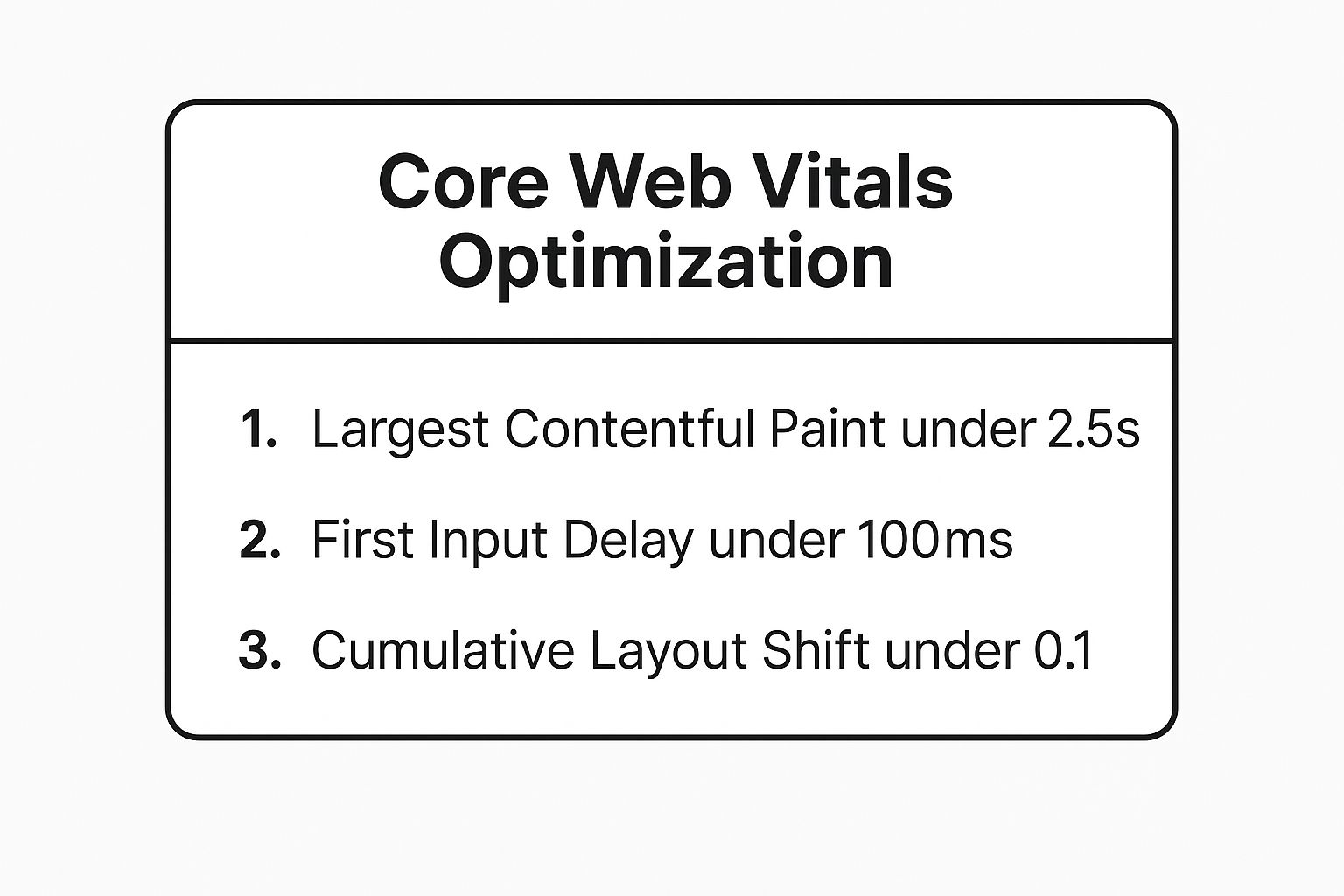
Meeting these thresholds is essential for ensuring your site provides a good user experience and is viewed favourably by Google’s ranking algorithms.
How to Audit and Optimise Your Site Speed
Start by getting a baseline measurement. Use free tools like Google PageSpeed Insights and your Google Search Console “Core Web Vitals” report to identify which pages need attention.
Here are actionable steps you can take:
- Optimise Your Images: Use modern image formats like WebP, which offers superior compression compared to traditional JPEGs and PNGs. Ensure images are correctly sized and implement lazy loading for all images that appear “below the fold.”
- Minimise Code Bloat: Reduce the impact of render-blocking resources, especially CSS and JavaScript. This means deferring non-critical scripts and minifying your code files to remove unnecessary characters and spaces.
- Leverage a CDN: A Content Delivery Network (CDN) stores copies of your site’s assets on servers around the world. This drastically reduces loading times for users, no matter their geographical location.
- Improve Server Response Time: Your web hosting plays a huge role. A cheap, slow hosting plan will always hold you back. Ensure your Time to First Byte (TTFB) is low, ideally under 200ms.
Beyond server-side optimisations, managing custom JavaScript implementation can significantly affect your site’s speed and Core Web Vitals performance. Even small, third-party scripts can introduce delays.
For a deeper understanding of these techniques, explore these website performance best practices.
2. Crawlability and Indexability Analysis
If a search engine can’t find and understand your content, it simply won’t rank. This is why the second crucial step in any technical seo audit checklist is analysing your website’s crawlability and indexability. It’s the process of ensuring that search engine bots, like Googlebot, can efficiently discover, access, and add your pages to their vast database, known as the index.

This part of your audit involves checking for any technical blockades that might be hiding your valuable content. This includes reviewing your robots.txt file, which gives instructions to bots, your XML sitemap, which acts as a roadmap, and your site’s internal linking structure, which creates pathways for bots to follow. For a small business in Surrey, ensuring your key service pages are crawlable is fundamental to being found by local customers.
Why It Matters for Your Business
For a local business, every page represents an opportunity to attract a new customer. If your “Emergency Plumber in Guildford” page isn’t being indexed, you’re invisible to people searching for that exact service. Making your site easy for Google to navigate ensures your marketing efforts aren’t wasted.
- Airbnb improved its internal linking architecture, which made it easier for Google to discover deeper pages, resulting in a reported 30% increase in indexed pages.
- By optimising its XML sitemaps for clarity and completeness, Etsy saw a remarkable 25% uplift in organic traffic within just six months.
- One major e-commerce site famously discovered that a shocking 40% of its product pages were invisible to search engines due to a poor internal linking structure, highlighting a massive loss of potential revenue.
These examples show that from global platforms to local service providers, controlling how search engines access your site is vital for growth.
Core Crawlability & Indexability Concepts: A Quick Reference
Understanding these concepts is key to managing your site’s visibility. Here’s what you need to focus on:
- Crawlability: Can search engine bots access your content? This is controlled by things like your robots.txt file and server uptime.
- Indexability: Will search engines add your page to their index after crawling it? This is managed by meta tags (like “noindex”) and canonical tags.
- Crawl Budget: The amount of time and resources Google allocates to crawling your website. An efficient site structure helps you make the most of it.
Getting these elements right ensures that the pages you want to rank are seen, and the pages you don’t (like admin logins or duplicate content) are correctly ignored.
How to Audit and Optimise for Crawlability & Indexability
Start your audit in Google Search Console. The “Pages” (indexing) report is your primary tool for spotting errors and understanding what Google sees.
Here are actionable steps you can take:
- Check Your Robots.txt File: Ensure you aren’t accidentally blocking important pages or directories with a “Disallow” directive. Your robots.txt file should be accessible at
yourdomain.co.uk/robots.txt. - Audit Your XML Sitemap: Your sitemap should be clean, up-to-date, and contain only the URLs you want to be indexed. It should be submitted to Google Search Console and free from errors.
- Analyse Internal Linking: Every important page should be linked from other relevant pages on your site. Implement breadcrumb navigation to provide clear pathways for both users and search bots.
- Use the “noindex” Tag Wisely: Apply the “noindex” meta tag to thank-you pages, internal search results, and thin or duplicate content pages to prevent them from appearing in search results and wasting crawl budget.
- Run a Crawl Simulation: Use tools like Screaming Frog or Sitebulb to crawl your site as a search engine would. This helps identify broken links (404s), redirect chains, and orphaned pages that have no internal links pointing to them.
3. Mobile-First and Responsive Design Compliance
In today’s digital landscape, your website’s performance on a mobile phone is not an afterthought; it is the main event. A critical part of any technical seo audit checklist is evaluating mobile-first and responsive design compliance. Since Google switched to mobile-first indexing, it predominantly uses the mobile version of your content for indexing and ranking. If your site offers a poor experience on mobile, your visibility in search results will suffer, no matter how good it looks on a desktop.
This audit step means meticulously checking how your website adapts and functions across various mobile devices. It involves ensuring that the design is truly responsive, that usability is seamless, and, crucially, that the content and structure are consistent between the mobile and desktop versions. For a small business in Surrey, where potential customers are often searching for services on the go, a flawless mobile experience is non-negotiable.

Why It Matters for Your Business
A mobile-optimised website directly impacts lead generation and sales. When a local customer needs a service urgently, they are almost certainly using their phone. A clunky, hard-to-navigate mobile site will send them straight to a competitor.
- McDonald’s recognised this and, after redesigning their mobile experience for simplicity and speed, saw a remarkable 75% increase in mobile conversions.
- Pinterest’s focus on a mobile-first approach was so successful that it now contributes to 80% of their total traffic coming from mobile devices.
- In a more local example, a Surrey-based restaurant chain improved its mobile usability with clearer navigation and larger buttons, resulting in a 150% increase in online orders.
These examples highlight a universal truth: a superior mobile experience translates directly into business growth, whether you’re a global brand or a local service provider.
How to Audit and Optimise Your Mobile Experience
Begin your audit with Google’s own tools. The Mobile-Friendly Test and the “Mobile Usability” report in Google Search Console will give you a clear, data-driven starting point for identifying issues like content being wider than the screen or clickable elements being too close together.
Here are actionable steps to ensure compliance:
- Prioritise Above-the-Fold Content: Ensure your most critical information, such as your phone number, a call-to-action, or key service offerings, is immediately visible on mobile screens without scrolling.
- Check Tap Target Size: All clickable elements like buttons and links must be large enough for easy tapping. Aim for a minimum size of 48×48 pixels with adequate spacing to prevent accidental clicks.
- Test on Real Devices: While browser simulation tools are useful, nothing beats testing on actual iPhones and Android devices. This helps you spot real-world usability issues that emulators might miss.
- Ensure Content Parity: Verify that your mobile site contains the same valuable content, including text, images, and videos, as your desktop site. Hiding content on mobile can negatively impact your SEO.
Building a website that performs beautifully on all devices is foundational to modern SEO. Discover more about the principles of mobile responsive web design on gfctech.co.uk to ensure your business provides the best possible user experience.
4. URL Structure and Architecture Optimisation
A logical and clean URL structure is like the signposting in a well-organised physical store. It guides both customers and search engines effortlessly to the right place. This part of your technical seo audit checklist examines the architecture of your website, ensuring that your URLs are not just functional but are also descriptive, consistent, and strategically structured to support your SEO goals. A well-thought-out site architecture improves crawlability, enhances user experience, and helps search engines understand the thematic hierarchy of your content.
For a small business in Surrey, this means creating intuitive paths for users looking for specific services or products. Instead of a messy, parameter-filled URL, a clear structure helps build user trust and makes your site easier to navigate. This clarity directly translates into how search engines perceive the importance and relevance of your pages, which is a critical factor for ranking in competitive local markets.
Why It Matters for Your Business
A clean URL structure is more than just a technical neatness exercise; it has a direct impact on user behaviour and search performance. It provides clear context for users and search engines, making your content more accessible and understandable.
- Zappos is a prime example of effective URL architecture. Their URLs, like
/shoes/sneakers/running, clearly communicate the page’s content, making it easy for users to navigate and for search engines to categorise. - HubSpot famously reorganised their blog’s URL structure to include topic categories. This architectural change was credited with helping to boost their organic traffic by over 20% by creating clearer thematic clusters.
- An e-commerce site reported a 15% increase in conversion rates after simplifying their product URLs. The clearer, more descriptive URLs improved user trust and made the site feel more professional and easier to browse.
These cases demonstrate that a strategic approach to your website’s architecture can yield significant returns, from improved rankings to higher sales, no matter your business size.
How to Audit and Optimise Your URL Structure
Begin by crawling your website using a tool like Screaming Frog to get a complete list of all your URLs. Analyse this list for inconsistencies, unnecessary parameters, or illogical hierarchies. Your goal is to create a structure that is predictable and descriptive.
Here are actionable steps you can take:
- Keep URLs Short and Descriptive: Aim to keep URLs under 60 characters where possible. This ensures they are fully visible in search results and are easy for users to read and remember.
- Use Hyphens for Separation: Always use hyphens (
-) to separate words in your URLs (e.g.,/local-seo-services). Search engines interpret hyphens as word separators, whereas underscores (_) are often ignored. - Maintain Consistency: Establish and stick to a consistent URL pattern across similar types of content. For example, all your service pages could follow the pattern
yourdomain.co.uk/services/service-name. - Implement a Logical Hierarchy: Your URL structure should mirror your site’s navigation. A logical folder structure (e.g.,
/blog/category/post-name) helps search engines understand the relationship between different pieces of content. - Avoid Dynamic Parameters: Where possible, avoid using dynamic URLs generated by databases (e.g.,
?id=123&cat=4). Use static, keyword-rich URLs instead. If dynamic URLs are unavoidable, use the URL Parameters tool in Google Search Console to indicate how Google should handle them.
For businesses looking to build a strong foundation, creating an SEO-friendly website structure from the outset is far more effective than trying to fix a messy architecture later.
5. HTTPS Security and Technical Infrastructure
In today’s digital landscape, website security is non-negotiable. A core component of any modern technical seo audit checklist is a thorough review of your site’s security protocols, particularly its use of HTTPS. HTTPS (Hypertext Transfer Protocol Secure) encrypts data exchanged between a user’s browser and your website, providing a vital layer of security and privacy. Google has explicitly stated that security is a top priority and uses HTTPS as a ranking signal.
This part of your audit focuses on ensuring your entire site is served securely via HTTPS. It involves checking your SSL certificate’s validity and configuration, ensuring all traffic is redirected from insecure HTTP versions, and implementing other security enhancements. For a small business in Surrey, a secure website isn’t just a technical requirement; it’s a powerful symbol of trust that tells potential customers their data is safe with you.
Why It Matters for Your Business
A secure connection builds immediate confidence with visitors, which is crucial for lead generation and e-commerce. When browsers like Google Chrome actively flag non-HTTPS sites as “Not Secure,” failing to implement it can directly harm your reputation and deter potential clients.
- Google Chrome now marks all HTTP sites as ‘Not Secure’, a prominent warning that can dramatically increase bounce rates as users lose trust.
- Shopify has reported that online stores using HTTPS have conversion rates up to twice as high as their HTTP counterparts, demonstrating the direct commercial impact of security.
- Wikipedia experienced immediate, noticeable improvements in its search engine rankings after fully migrating its massive site to HTTPS, confirming its importance as a ranking factor.
These examples highlight that whether you’re a local tradesperson capturing lead information or a retailer processing payments, a secure site is fundamental to your online success.
How to Audit and Optimise Your Site Security
Your first step is to verify your SSL certificate’s implementation. You can use free online tools like SSL Labs’ SSL Test to get a detailed report on your certificate’s configuration and identify any weaknesses.
Here are actionable steps to secure your website:
- Implement 301 Redirects: Ensure that all HTTP versions of your URLs permanently redirect to their HTTPS equivalents. This consolidates link equity and ensures all users land on the secure version of your site.
- Update All Internal Links: Scour your website’s code, sitemaps, and canonical tags to ensure all internal URLs point directly to the HTTPS version. This avoids unnecessary redirect chains that can slightly slow down your site and the crawling process.
- Check for Mixed Content Issues: Mixed content occurs when an HTTPS page loads insecure (HTTP) resources like images, scripts, or stylesheets. This breaks the secure connection and triggers browser warnings. Use your browser’s developer tools to find and fix these errors.
- Monitor Google Search Console: After migrating to HTTPS, keep a close eye on the “Index Coverage” and “Crawl Stats” reports in Search Console. This will help you quickly identify any new errors or issues that arise from the switch.
- Consider HSTS Headers: For enhanced security, implement an HSTS (HTTP Strict Transport Security) header. This tells browsers to only ever connect to your site using HTTPS, which helps protect against certain types of cyber-attacks.
6. Structured Data and Schema Markup Implementation
Moving beyond how your site performs, this part of the technical seo audit checklist focuses on how well you communicate your content’s meaning to search engines. Structured data, often implemented using Schema.org vocabulary, is a standardised format for providing explicit clues about the meaning of a page. It’s like giving Google a detailed blueprint of your content, helping it understand context far beyond simple keywords.
This audit step involves analysing how effectively your website uses this “language of search engines”. By marking up key elements like your business address, services, products, or events, you can unlock powerful rich results in search. These enhanced listings, such as star ratings, pricing, and FAQ dropdowns, make your business stand out on a crowded results page, directly impacting user engagement.
Why It Matters for Your Business
For small businesses in Surrey and the South East, standing out in local search is paramount. Structured data gives you a direct way to enhance your search appearance and provide value to users before they even click.
- Recipe websites that use dedicated recipe schema often experience a 30% higher click-through rate on average due to enhanced listings with cooking times and ratings.
- Local businesses with properly implemented
LocalBusinessschema are estimated to be 42% more likely to be considered reputable by search engines, boosting their visibility in local map packs. - E-commerce sites leveraging
Productschema can display crucial information like price, stock availability, and review stars directly in search results, attracting qualified buyers.
These examples highlight how translating your content into a machine-readable format can deliver tangible benefits, from increased visibility to higher quality traffic.
Core Schema Types: A Quick Reference
While thousands of schema types exist, a few are fundamental for most local businesses. Focusing on these provides the most significant initial impact.
- Organisation/LocalBusiness: Details your business name, address, phone number (NAP), logo, and opening hours.
- Product: Essential for e-commerce, it describes item names, images, price, availability, and reviews.
- Service: Outlines the services you offer, including a description and your service area.
- FAQPage: Allows you to mark up a list of questions and answers, which can appear as a rich dropdown in search results.
- Review/AggregateRating: Shows off your hard-earned customer ratings as stars in the SERPs.
Implementing the right schema helps search engines accurately categorise and feature your content, making your business a more attractive and informative option for potential customers.
How to Audit and Optimise Your Schema Markup
Begin by checking your current implementation. Use tools like the Schema Markup Validator and Google’s Rich Results Test to see what structured data Google can detect on your pages and whether it’s eligible for rich results.
Here are actionable steps you can take:
- Identify High-Impact Opportunities: Review your key pages, such as your homepage, service pages, product pages, and blog posts. Which schema types are most relevant? Start with
LocalBusinessfor your contact page andServicefor your main offerings. - Implement Correctly: You can add schema directly into your website’s HTML (often as JSON-LD, which is Google’s preferred format). Many WordPress plugins, like Rank Math or Yoast SEO, offer user-friendly interfaces to generate this code for you.
- Validate and Test: Before deploying, always test your markup. Use the Rich Results Test to ensure there are no errors and to preview how your page might look in search.
- Monitor Performance: Once implemented, go to your Google Search Console account. Under the “Enhancements” section, you can monitor the performance of your rich results, see which pages are indexed with schema, and fix any reported issues.
7. Duplicate Content and Canonicalization Management
A crucial step in any technical seo audit checklist is tackling duplicate content. This occurs when identical or “substantially similar” content appears on the internet at more than one URL. Search engines like Google aim to provide users with unique, valuable results, so they may get confused when they find multiple versions of the same page. This can dilute your ranking signals, split link equity, and ultimately lead to the wrong page (or no page at all) appearing in search results.
This part of your audit is about systematically identifying these duplicates and telling search engines which version is the “master copy”. This process, known as canonicalisation, is vital for maintaining a clean, efficient, and authoritative website structure. For businesses in Surrey and the South East, ensuring your key service pages are seen as the definitive source is essential for local search dominance.
Why It Matters for Your Business
Duplicate content can arise for many reasons: printer-friendly versions of pages, URL parameters for tracking or filtering (common on e-commerce sites), and even having both http:// and https:// versions of your site live. Without proper management, you risk search engines devaluing your content.
- Moz famously boosted their organic traffic by 25% after a major clean-up initiative that focused on identifying and resolving widespread duplicate content issues across their site.
- An e-commerce retailer saw a 40% improvement in product page rankings after consolidating product variations (e.g., different colours or sizes with separate URLs) using canonical tags to point to a single, preferred product page.
- A major news website successfully avoided duplicate content penalties by correctly using canonical tags on articles syndicated to other publications, ensuring their original post retained its authority.
These examples highlight how resolving content duplication isn’t just a tidying exercise; it’s a strategic move that directly impacts your search visibility and traffic.
How to Audit and Manage Duplicate Content
Begin by using tools like Siteliner or Screaming Frog to crawl your site and identify potential duplicate or near-duplicate pages. You should also regularly check the “Pages” report in Google Search Console for warnings about duplicate content.
Here are actionable steps you can take to resolve these issues:
- Use
rel="canonical"Tags: This is your primary tool. The canonical tag is a snippet of HTML code that tells search engines which version of a page you consider to be the main one. Place it in the<head>section of any duplicate pages, pointing to the URL of the master version. - Maintain Consistent URL Structures: Decide on a preferred domain format (e.g.,
https://www.yourbusiness.co.ukvshttps://yourbusiness.co.uk) and use 301 redirects to enforce it. Ensure your internal linking is consistent to avoid creating new duplicates. - Handle URL Parameters in Search Console: If your site uses parameters for things like filtering or session IDs (e.g.,
.../products?colour=blue), you can use the URL Parameters Tool in Google Search Console to tell Google how to handle them, preventing them from being indexed as separate pages. - Use
noindexSparingly: For thin or low-value duplicate pages that serve no user purpose (like old archive pages or specific tag pages), you can use anoindextag. This tells search engines to exclude them from the index altogether. This is a more forceful option than a canonical tag. - Implement 301 Redirects: For defunct duplicate pages (e.g., after a site migration or restructuring), a permanent 301 redirect is the best solution. It passes most of the link equity from the old page to the new one and ensures users and search engines are sent to the correct location.
Technical SEO Audit Checklist Comparison
| Item | Implementation Complexity | Resource Requirements | Expected Outcomes | Ideal Use Cases | Key Advantages |
|---|---|---|---|---|---|
| Site Speed and Core Web Vitals Optimization | Moderate to High – requires development work | High – developer time, tools | Improved rankings, faster load times, better UX | Sites needing better speed and UX | Direct ranking factor, boosts engagement |
| Crawlability and Indexability Analysis | Moderate to High – ongoing monitoring needed | Medium to High – SEO tools, audits | Increased indexed pages, better crawl efficiency | Large sites with many pages | Ensures maximum content visibility and indexing |
| Mobile-First and Responsive Design Compliance | Moderate to High – design and testing intensive | High – design, testing, development | Better mobile SEO, improved UX on mobile | Mobile-forward sites or high mobile traffic | Aligns with mobile-first indexing, reduces bounce |
| URL Structure and Architecture Optimization | Moderate – requires planning and redirects | Medium – SEO and dev coordination | Clear navigation, improved SEO clarity | Sites restructuring URLs or navigation | Better UX, improved search clarity and CTR |
| HTTPS Security and Technical Infrastructure | Moderate – technical setup and monitoring | Medium – security tools and SSL | Improved trust, minor ranking boost | Sites migrating to HTTPS or improving security | Builds trust, protects data, confirmed ranking factor |
| Structured Data and Schema Markup Implementation | Moderate – technical markup implementation | Medium – SEO and dev time | Enhanced SERP appearance, higher CTR | Sites wanting rich search features | Enables rich snippets, improves search understanding |
| Duplicate Content and Canonicalization Management | Moderate to High – technical and ongoing management | Medium to High – SEO audits, dev | Consolidated rankings, improved crawl efficiency | Sites with duplicate or syndicated content | Prevents dilution, consolidates authority |
From Checklist to Action: Building Your Technical SEO Advantage
You have now navigated through the comprehensive world of a technical SEO audit checklist. From the critical first impressions shaped by your Core Web Vitals to the behind-the-scenes structure of your XML sitemaps and schema markup, each item on this list represents a vital cog in your website’s performance machine. It’s easy to feel overwhelmed by the sheer number of checks, but remember: this isn’t about achieving perfection overnight. It’s about making steady, informed progress.
The real power of this checklist is unlocked when you move from auditing to action. Completing the audit is the diagnosis; the next step is the treatment plan. Your priority should be to create a roadmap that balances impact with effort. For many local businesses in Surrey, the quickest and most significant wins often come from resolving foundational issues. Addressing broken links, fixing crawl errors flagged in Search Console, or ensuring every page is secure with HTTPS can deliver immediate benefits with relatively low effort. These fixes build a solid base upon which you can layer more complex improvements.
Key Takeaways and Your Path Forward
Mastering the elements of this technical SEO audit checklist provides a significant competitive advantage. A technically sound website isn’t just a box-ticking exercise for Google; it directly translates into a better experience for your customers. A faster-loading site reduces frustration, a mobile-friendly design welcomes users on any device, and clear navigation helps them find what they need quickly. These factors build trust and encourage conversions, turning browsers into loyal customers.
To turn this knowledge into tangible results, follow these steps:
- Prioritise Ruthlessly: Use a simple framework. Label each issue you’ve found as high-impact/low-effort, high-impact/high-effort, low-impact/low-effort, or low-impact/high-effort. Tackle the “high-impact/low-effort” items first.
- Document Everything: Create a working document or spreadsheet to track each issue, the proposed solution, who is responsible for the fix, and the date it was resolved. This creates accountability and a historical record.
- Monitor and Measure: After implementing a batch of fixes, monitor your key metrics. Check Google Analytics for changes in user engagement, organic traffic, and conversion rates. Use Google Search Console to see if your Core Web Vitals scores improve or if previously indexed pages with errors are now validated.
- Schedule Regular Check-ups: Technical SEO is not a one-and-done task. Websites evolve, content is added, and search engine algorithms change. Plan to revisit this checklist quarterly or biannually to stay ahead of potential problems.
Frequently Asked Questions (FAQs)
1. How often should I perform a technical SEO audit?
For most small businesses, a full, in-depth technical audit is recommended at least once a year. However, it’s wise to conduct mini-audits or “health checks” on a quarterly basis. You should also perform a check after significant website changes, such as a redesign, platform migration, or a major content overhaul, to catch any new issues immediately.
2. I’ve fixed all the errors. Why isn’t my ranking improving?
Patience is key. It can take time for Google to recrawl your site and for changes to be reflected in search rankings. Furthermore, technical SEO is just one pillar of a successful strategy. Your rankings are also influenced by content quality, backlink profile, and local relevance. Ensure your technical fixes are supported by a strong overall SEO strategy.
3. Which tools are essential for a small business owner to use for an audit?
At a minimum, every business owner should be familiar with Google Search Console and Google Analytics. These free tools provide a wealth of data directly from Google. For deeper insights, tools like Screaming Frog (which has a free version for smaller sites), GTmetrix (for speed analysis), and Ahrefs’ Webmaster Tools (a free alternative) are excellent starting points.
4. What’s the single most important thing to fix first?
If you have to pick just one area, focus on crawlability and indexability. If search engines cannot efficiently find, crawl, and understand your pages, nothing else matters. Check your robots.txt file for unintentional blocks and ensure your key service and location pages are being indexed in Google Search Console.
5. Can I do a technical SEO audit myself, or do I need to hire an expert?
It’s a mix. A business owner can certainly use this technical SEO audit checklist to handle basic checks and identify obvious problems using free tools. However, diagnosing complex issues like Core Web Vitals bottlenecks, advanced schema implementation, or international SEO hreflang tags often requires specialist expertise. An expert can conduct a more thorough audit and, crucially, implement the fixes correctly and efficiently.
Feeling overwhelmed by the technical details? For small businesses in Surrey and the South East, managing a website’s technical health while running day-to-day operations can be a real challenge. At GFC Tech, we specialise in taking the complexity out of technical SEO, providing the expert support you need to build a powerful and reliable online presence. Let GFC Tech handle your technical audit so you can focus on what you do best: growing your business.
Adam is a Founder of GFC Tech, a company dealing in SEO and website design and development services. Adam has been an SEO expert for the past 8 years and has been working with different companies in this field. He is an SEO consultant and a marketing strategist and works closely with his clients to ensure that his marketing plans and strategies provide them with the marketing advantages they need to grow their business. Adam’s main role is an SEO consultant, but he is also involved in all technical aspects. Adam also develops WordPress websites, designs them professionally and performs SEO for them so they can rank on the first page of google.


